MS Project at the University of Utah, and research for work at the SCI Institute
For my Master's Project at the University I developed On-Demand Fakequakes, a Python-based
web application for launching earthuake simulation using the Python-based software MudPy.
It was an amazing project that spanned a whole year from May 2024 to May 2025. The project included a user interface (UI), a complex Amazon Web Services (AWS) workflow with infrastructure
built as Python code, automatic resouce deployment and container builds via GitHub Actions, and much more.Unfortunately, months after graduation, the website (where the AWS costs were covered by a NASA grant) is no longer up. However, if you are reading this I want
to get the UI running on a public domain! I do not have enough high-quality images/videos as I wish I would have to show off the UI.The project began in the summer of 2024 when I did an internship at the University of Oregon working under Dr. Diego Melgar, a former collaborator. The goal was for me
to build a web app with a good interface for launching MudPy earthquake simulations - a goal he had had for a while with his complex software package. This collaboration spawned
from previous work I did from 2022 to 2023; you can read about that in a published paper I authored here.The UI was all built in Python using Plotly Dash. After this project I have gained much more experience in React and Svelte, and now I wish would not have used Python for the front-end (haha).
All of the UI was built with what was essentially Python wrappers around HTML and CSS, which was annoying but did help me to just learn something new.The UI essentially had a map where you could choose a predefined zone to simulate earthuakes from, then you could select all or a subset of thoursands (with different meshes to choose from) of polygons from a zone to utilize.
Then users could essentially configure simple and advanced parameters (through the UI or a JSON file), enter their email, and hit a button to launch earthquake simulations (where the simulations ran on AWS EC2 instances).The project was much more that just a front-end. The goal turned out to be an enormous project that required a ton of engineering, development, and a year's worth of time.
Thus, when the internship ended I continued to work on the project and I tied it into my work and research at the SCI Institute. Over that time, I built an entire automated workflow
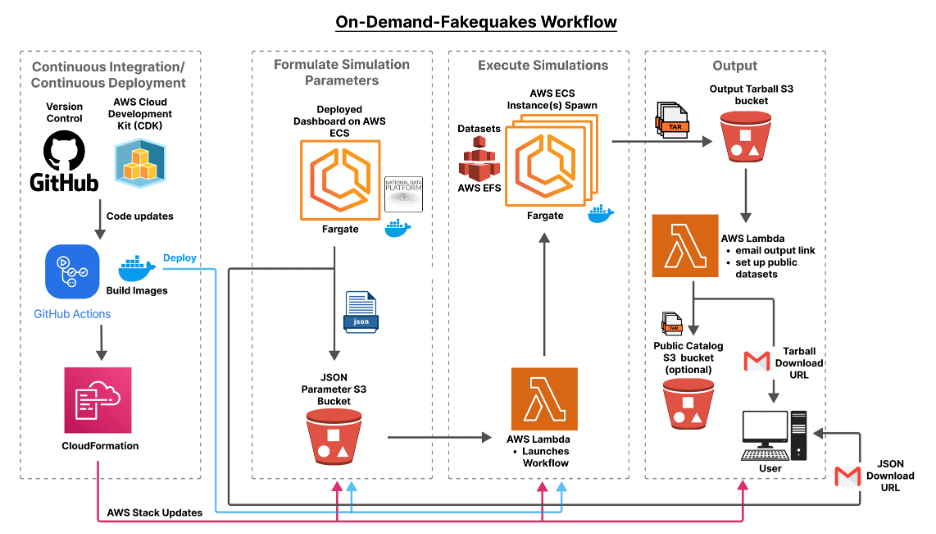
using AWS services (ECS Fargate, IAM Policies, Lambda Functions, etc.) that could be easily redeployed with my pipeline and infrastructure.Here is a diagram I created using Figma to illustrate the flow and utilized technologies of On-Demand Fakequakes:
This shows the flow from the front-end, that was deployed through AWS, which could trigger a JSON file (with simulation parameters) to be deposited
into an S3 bucket and thus the larger workflow.
Here is a diagram that illustrates the high-level parts of the continuous integration/continuous deployment (CI/CD) pipeline for the app:
Through AWS CloudFormation and Cloud Development Kit (services that enables you to turn code into AWS infrastructure resources in an automated and secure manner)
and GitHub Actions, I engineered a CI/CD pipeline. Updates to the Git repo would trigger AWS resource stacks to updated and deployed, Docker images to be rebuilt, the UI to be updated, and more without letting the live website go down.
In these efforts I dockerized my front-end app and the MudPy earthquake simulation software so they could run on AWS ECS instances. The entire infrastrure-as-code in Python was really cool.
Theoretically I could have taken that code and deploy the workflow/resoources on other AWS account, but I never tried. I did take down the workflow and re-deploy it multiple times.A cool AWS service I utilized was Step Functions. Step Functions allows me to create a DAG-like workflow between step in the workflow, and it provides automatic diagrams
to visualize steps and dependencies, catch errors, debug, and more.Again, the website is no longer up, but here is a screenshot of the UI to get a sense of what it looked like:
In the screenshot above you can see the side-panel for customizing simulation parameters, an interactive map featuring 3 different zones to simulate earthquakes from (Cascadia, Chile, and New Zealand), and a login button at the top where the login system used AWS Cognito.
Overall, the project was such a valuable learning experience that allowed me to program so many different features with so many different technologies.
 This shows the flow from the front-end, that was deployed through AWS, which could trigger a JSON file (with simulation parameters) to be deposited
into an S3 bucket and thus the larger workflow.
This shows the flow from the front-end, that was deployed through AWS, which could trigger a JSON file (with simulation parameters) to be deposited
into an S3 bucket and thus the larger workflow.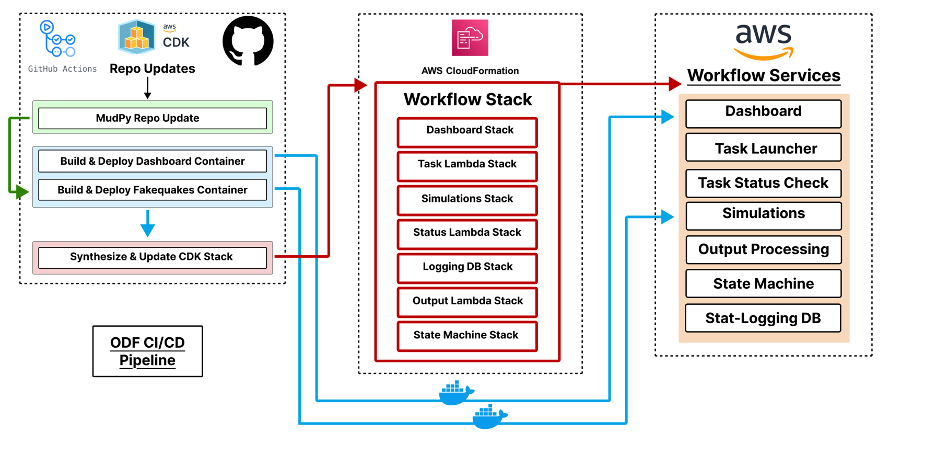 Through AWS CloudFormation and Cloud Development Kit (services that enables you to turn code into AWS infrastructure resources in an automated and secure manner)
and GitHub Actions, I engineered a CI/CD pipeline. Updates to the Git repo would trigger AWS resource stacks to updated and deployed, Docker images to be rebuilt, the UI to be updated, and more without letting the live website go down.
Through AWS CloudFormation and Cloud Development Kit (services that enables you to turn code into AWS infrastructure resources in an automated and secure manner)
and GitHub Actions, I engineered a CI/CD pipeline. Updates to the Git repo would trigger AWS resource stacks to updated and deployed, Docker images to be rebuilt, the UI to be updated, and more without letting the live website go down.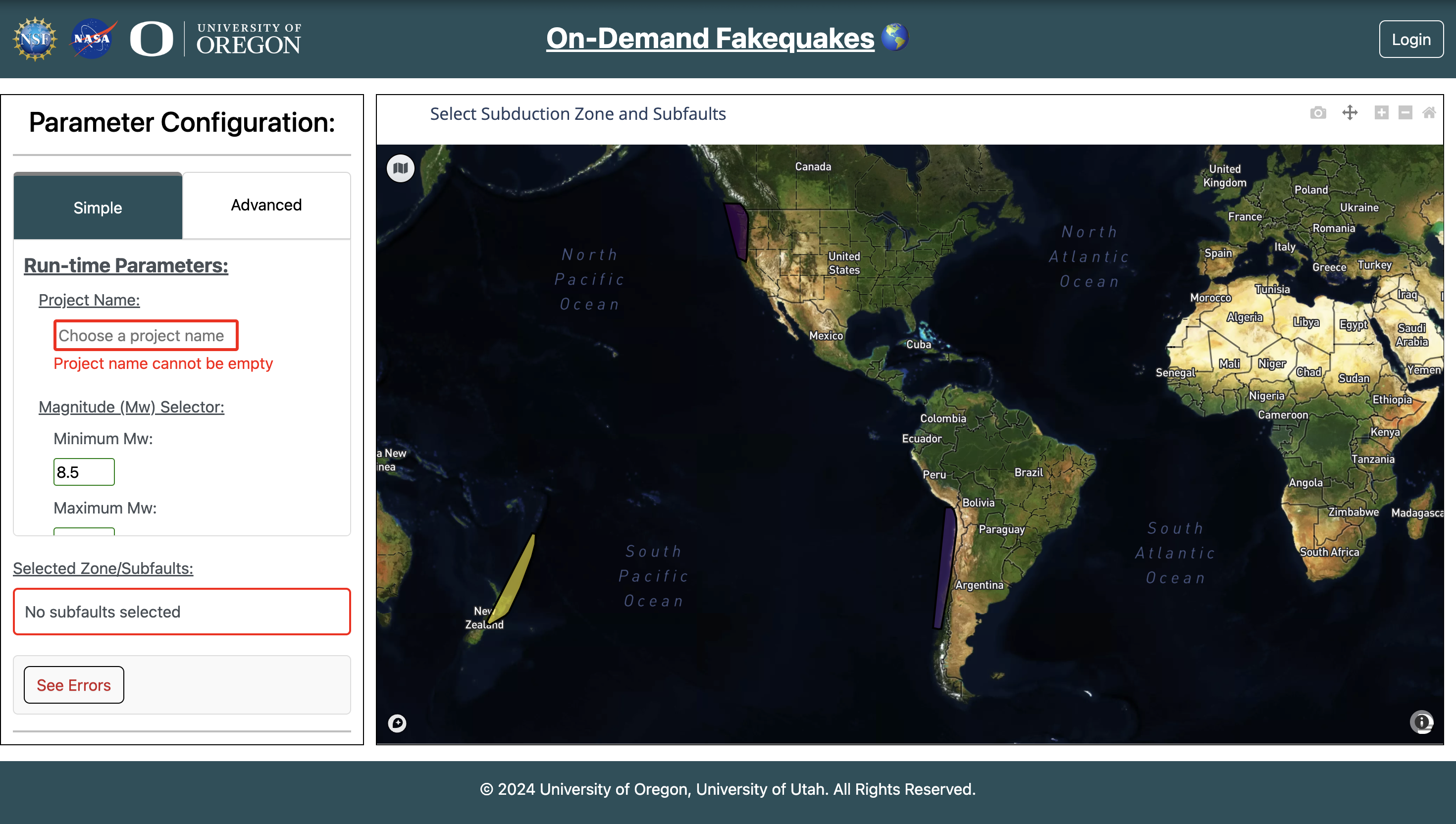 In the screenshot above you can see the side-panel for customizing simulation parameters, an interactive map featuring 3 different zones to simulate earthquakes from (Cascadia, Chile, and New Zealand), and a login button at the top where the login system used AWS Cognito.